Before performing a GPS map update, it is essential to accurately identify the navigation version installed in your BMW or Mini. Each system uses a specific map version, and selecting the wrong one will prevent installation.
However, this is not critical because FSC codes are designed to secure the update process. If you download the wrong map version, the installation simply will not start.
Since 2008, several generations of navigation maps have been released depending on vehicle models and iDrive systems. The main versions include PREMIUM, NEXT, MOVE, MOTION, and EVO, each corresponding to a specific navigation system generation.
In this guide, we explain how to quickly identify your navigation version directly from your vehicle’s screen, so you can download the correct map.
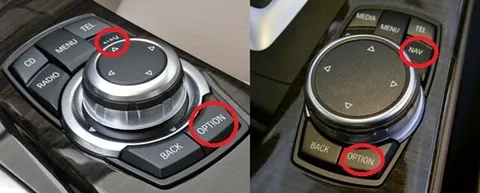
Get into your vehicle and turn on the ignition. Using your iDrive controller, navigate through the following menu: NAV → OPTION → scroll down to “Version Information”.
You will see a screen similar to the one below. Focus on the “Road Map” line.
This indicates the map currently installed on your vehicle and its version.
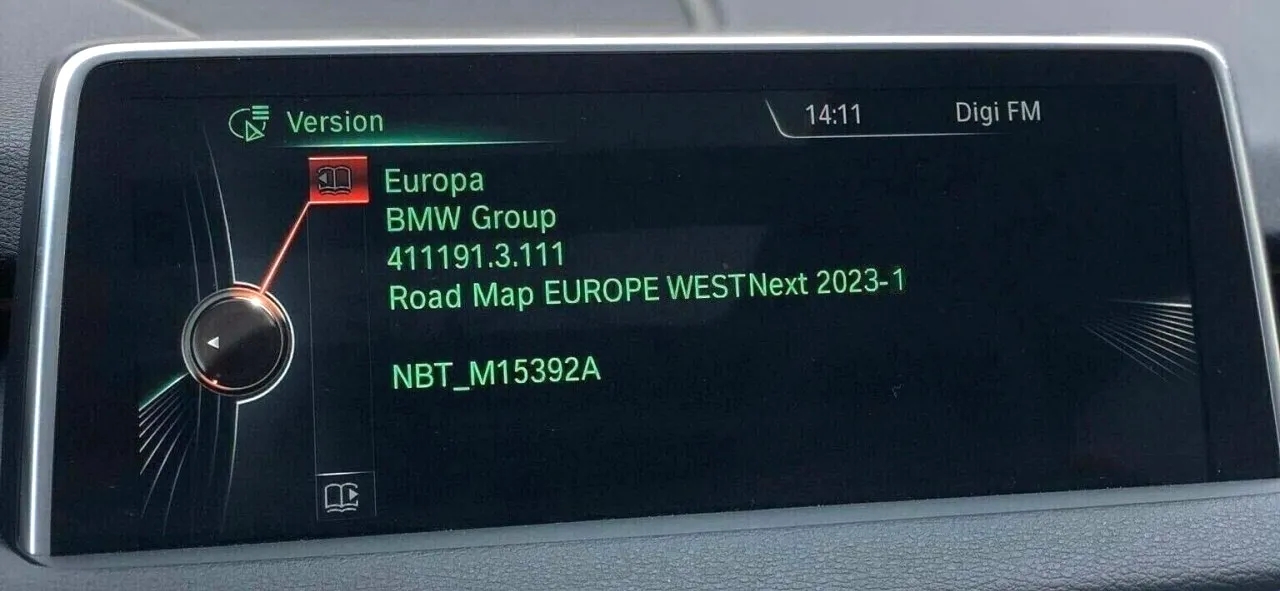
You will see the following information: